Quickstart Remix

Intro
This example will show you how to build a simple user management app from scratch using Kontenbase and Remix. Before begin make sure that you are familiar with Remix basics.
This also includes:
- Kontenbase Database: to store data, such as users and profiles.
- Kontenbase SDK: this will make easier to handle auth and service features.
- Kontenbase Authentication & Authorization: users can sign in with username and password.
- Kontenbase Storage: users can upload a photo.
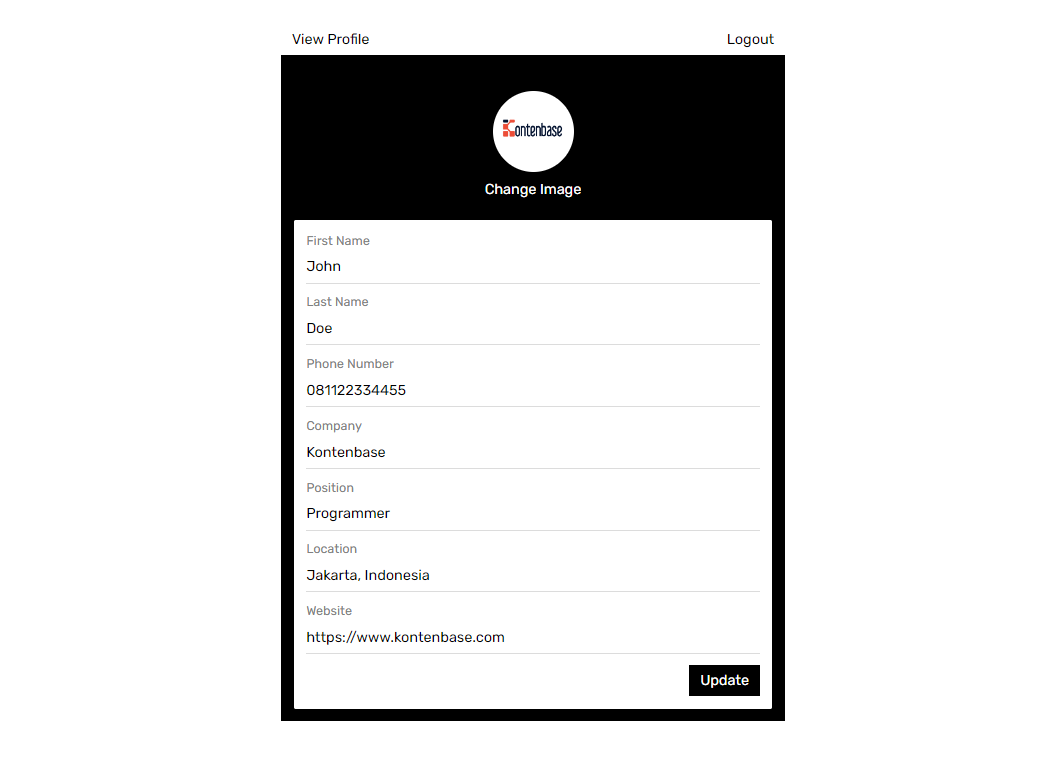
By the end, you'll have an application that is able to register a new user, login and update some basic profile details.
Project Set up
Before we start building we're going to set up our Database and get the API KEY.
Create a Project
- Go to app.kontenbase.com
- Click on
Create Projectbutton. - Enter your project details.
- Wait for the new project to launch.
Set up the Database Service
Now we are going to set profile and Users service.
- Click on
Create New Servicebutton. - Fill in the service detail, give a name
profile, select as private. - Click on
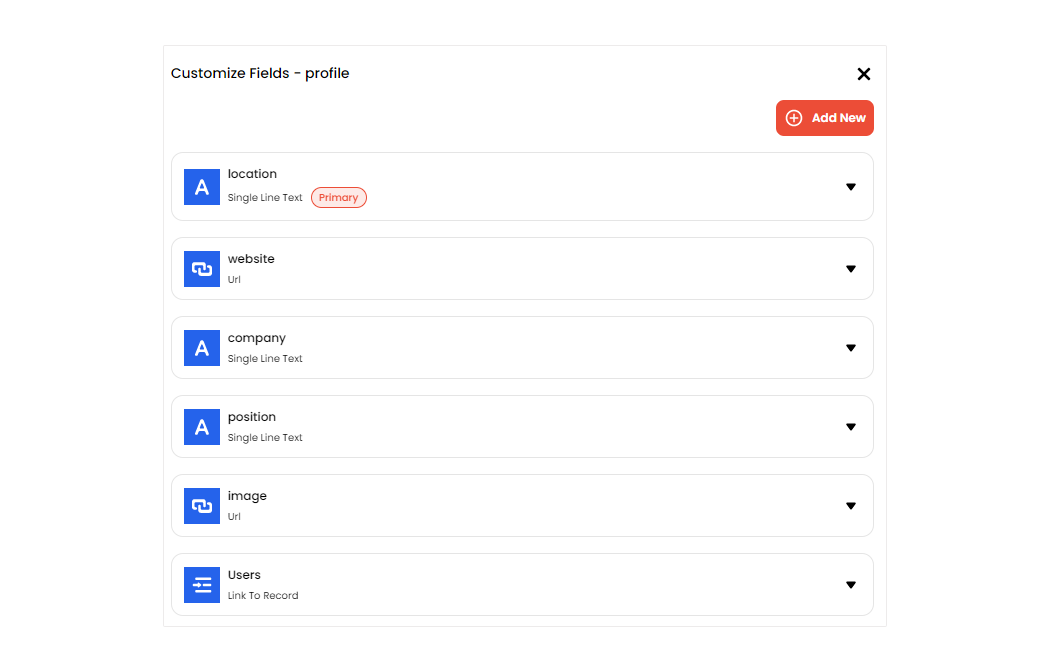
profileservice, selectCustomize Fields, then add some fields following picture below. note, there is a fieldUserswith data typeLink To Record. It means we create a data relation between the serviceprofilewith theUsers.
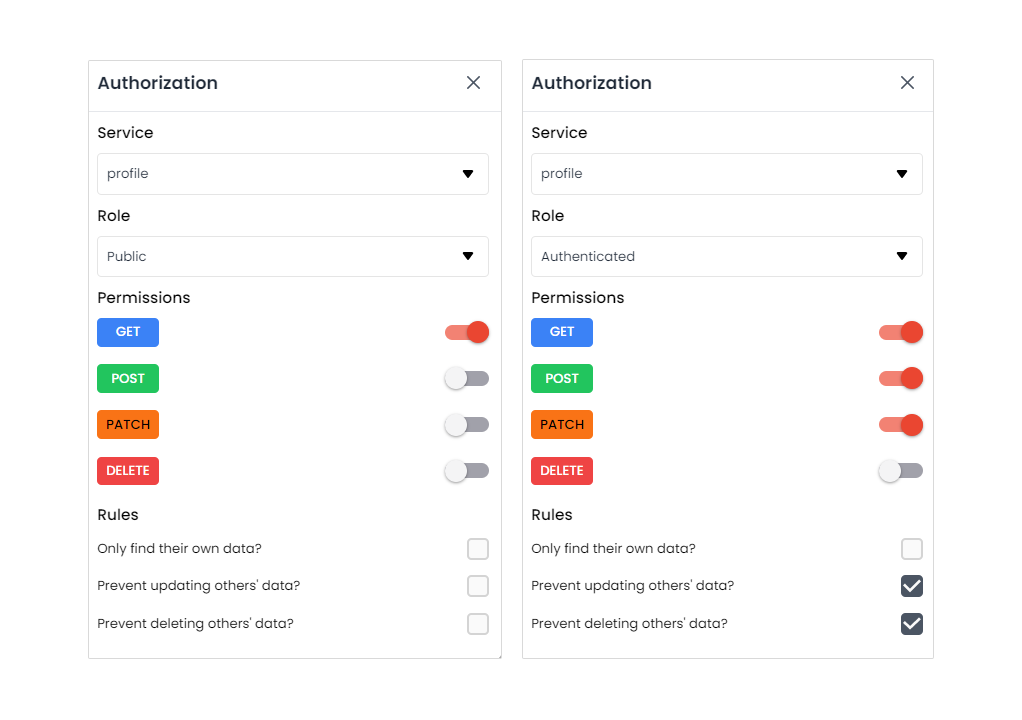
We need some configuration in Users service to make both autheticated user and public can get or access users data. But don't worry, by default that will not return password, so user still secure.
- Click on
Authorizationbutton. - Change service to
Usersand turn onGETpermission for role autheticated and public.
- Add new field called :
username, select data type :username, then set field as required and unique. - Enable username as user identity when logging in: click
Settings, thenConfigurationon the sidebar, findUser identity fieldand change to username.
Get the API KEY
- Go to the
Settings. - Click
APIon the sidebar. - Find your API KEY in this page.
Building the App
Initialize a Remix App
We can use this command to initialize an app called kontenbase-remix:
npx create-remix@latest kontenbase-remix
Then choose this option when prompted:
- What type of app do you want to create?
Just the basics - Where do you want to deploy?
Remix App Server - TypeScript or JavaScript?
JavaScript - Do you want me to run npm install?
Yes
navigate and open the project folder:
cd kontenbase-remix
Let's install Kontenbase SDK, simply use the command below:
npm install @kontenbase/sdk
Save the API KEY to environment variable in a .env that you copied earlier.
KONTENBASE_API_KEY=YOUR_KONTENBASE_API_KEY
Once that is done, let's create a helper file to initialize the Kontenbase Client and configure your SDK with the API KEY:
import { KontenbaseClient } from '@kontenbase/sdk';

const KONTENBASE_API_KEY = process.env.KONTENBASE_API_KEY;

export const kontenbase = new KontenbaseClient({
  apiKey: KONTENBASE_API_KEY,
});

export const kontenbaseApiUrl = `https://api.kontenbase.com/query/api/v1/${KONTENBASE_API_KEY}`;
An optional step is adding stylesheet to make the App look nice. create folder styles, then create global.css file and copy the css code that we have provided below:
@import url('https://fonts.googleapis.com/css2?family=Rubik:wght@300;400;500;600;700&display=swap');

* {
  margin: 0;
  padding: 0;
  box-sizing: border-box;
  font-family: 'Rubik', sans-serif;
}
a {
  text-decoration: none;
}
button,
.button {
  color: black;
  background-color: transparent;
  border: none;
  padding: 8px 12px;
  font-size: 16px;
  cursor: pointer;
}
.button-ouline {
  border: 1px solid gainsboro;
}
.button-primary {
  background-color: black;
  color: white;
}
.auth-page {
  margin: 0 auto;
  width: 560px;
  padding: 14px;
}
.auth-button {
  text-align: right;
  margin-bottom: 16px;
}
.auth-page h2 {
  text-align: center;
}
.form-group {
  margin-bottom: 12px;
  font-size: 16px;
}
.form-group label {
  display: block;
  margin-bottom: 4px;
  font-weight: 500;
  font-size: 16px;
}
.form-group input {
  padding: 8px 12px;
  width: 100%;
  font-size: 16px;
}
.form-button {
  text-align: right;
}
.profile-page {
  margin: 0 auto;
  width: 560px;
}
.profile-wrapper {
  background-color: black;
  padding: 14px;
  color: white;
}
.profile-header {
  text-align: center;
  padding: 24px 0;
}
.profile-title {
  margin: 8px 0;
  font-size: 24px;
  font-weight: 600;
  text-transform: capitalize;
}
.image-avatar {
  border-radius: 50px;
}
.card {
  background-color: white;
  color: black;
  border-radius: 2px;
  padding: 14px;
}
.card:not(:last-child) {
  margin-bottom: 12px;
}
.card h3 {
  font-weight: 500;
  margin-bottom: 24px;
}
.card-field:not(:last-child) {
  margin-bottom: 12px;
}
.card-field input {
  font-size: 16px;
}
.card span,
.card label {
  display: block;
  font-size: 14px;
  color: gray;
  margin-bottom: 4px;
}
.card input {
  display: block;
  font-family: 16px;
  padding: 8px 8px 8px 0;
  color: black;
  width: 100%;
  border: none;
  border-bottom: 1px solid gainsboro;
  outline: none;
}
.website-link {
  text-decoration: none;
  color: black;
}
.logout-button {
  text-align: end;
}
input[type='file'] {
  display: none;
}
.label-file {
  display: flex;
  flex-direction: column;
  align-items: center;
  margin-top: 2px;
  cursor: pointer;
}
.label-file span {
  margin-top: 10px;
}
.button-top {
  display: flex;
  justify-content: space-between;
}
.link-email {
  text-decoration: none;
  color: black;
}
go to app/root.jsx and add the code below to import the css code:
import {
  Links,
  LiveReload,
  Meta,
  Outlet,
  Scripts,
  ScrollRestoration,
} from '@remix-run/react';
import globalStylesUrl from '~/styles/global.css';

export const meta = () => ({
  charset: 'utf-8',
  title: 'New Remix App',
  viewport: 'width=device-width,initial-scale=1',
});

export const links = () => [{ rel: 'stylesheet', href: globalStylesUrl }];

export default function App() {
  return (
    <html lang="en">
      <head>
        <Meta />
        <Links />
      </head>
      <body>
        <Outlet />
        <ScrollRestoration />
        <Scripts />
        <LiveReload />
      </body>
    </html>
  );
}
Set up Login and Register Components
Before we set up the Auth Components, firstly create cookie.js file in app/utils to set and get token returned by the Kontenbase API.
copy the code below:
import { createCookie } from '@remix-run/node';

const cookieOptions = {
  path: '/',
  httpOnly: true,
  secure: true,
  maxAge: 604_800,
};

export const kontenbaseToken = createCookie('token', {
  ...cookieOptions,
});

export const getToken = async (request) => {
  const cookieHeader = request.headers.get('Cookie');
  const token = await kontenbaseToken.parse(cookieHeader);
  return token;
};
Let's set up the react components to manage login and register. We'll use username and password to login.
Create a folder which will be called components, then create Login.jsx and Register.jsx file inside that folder and copy the code below in each files.
import { Form } from '@remix-run/react';
import { json, redirect } from '@remix-run/node';
import { kontenbase } from '~/lib/kontenbase.server';
import { kontenbaseToken } from '~/utils/cookie';

export const processLogin = async (formData) => {
  const username = formData.get('username');
  const password = formData.get('password');
  const { token, error } = await kontenbase.auth.login({
    username,
    password,
  });

  if (error) {
    return json({
      error,
    });
  }

  if (token) {
    return redirect('/profile', {
      headers: {
        'Set-Cookie': await kontenbaseToken.serialize(token),
      },
    });
  }
};

const Login = () => {
  return (
    <Form method="post">
      <input type="hidden" name="operation" value="login" />
      <div className="form-group">
        <label>Username</label>
        <input name="username" required />
      </div>
      <div className="form-group">
        <label>Password</label>
        <input type="password" name="password" required />
      </div>
      <div className="form-button">
        <button className="button button-primary">Submit</button>
      </div>
    </Form>
  );
};

export default Login;
import { Form } from '@remix-run/react';
import { json, redirect } from '@remix-run/node';
import { kontenbase } from '~/lib/kontenbase.server';
import { kontenbaseToken } from '~/utils/cookie';

export const processRegister = async (formData) => {
  const firstName = formData.get('firstname');
  const lastName = formData.get('lastname');
  const email = formData.get('email');
  const username = formData.get('username');
  const password = formData.get('password');
  const {
    user,
    token,
    error: errorRegister,
  } = await kontenbase.auth.register({
    firstName,
    lastName,
    email,
    username,
    password,
  });
  const { error: ErrorProfile } = await kontenbase.service('profile').create({
    Users: [user?._id],
  });

  if (errorRegister || ErrorProfile) {
    return json({
      error: errorRegister || ErrorProfile,
    });
  }

  if (token) {
    return redirect('/profile', {
      headers: {
        'Set-Cookie': await kontenbaseToken.serialize(token),
      },
    });
  }
};

const Register = () => {
  return (
    <Form method="post">
      <input type="hidden" name="operation" value="register" />
      <div className="form-group">
        <label>First Name</label>
        <input name="firstname" required />
      </div>
      <div className="form-group">
        <label>Last Name</label>
        <input name="lastname" />
      </div>
      <div className="form-group">
        <label>Username</label>
        <input name="username" required />
      </div>
      <div className="form-group">
        <label>Email</label>
        <input name="email" required />
      </div>
      <div className="form-group">
        <label>Password</label>
        <input type="password" name="password" required />
      </div>
      <div className="form-button">
        <button className="button button-primary">Submit</button>
      </div>
    </Form>
  );
};

export default Register;
Find index.jsx inside the routes folder and copy the code below to import Login and Register components:
import * as React from 'react';
import { useActionData } from '@remix-run/react';
import Login, { processLogin } from '../components/Login';
import Register, { processRegister } from '../components/Register';

export const action = async ({ request }) => {
  const formData = await request.formData();
  const operation = formData.get('operation');

  if (operation === 'login') {
    return processLogin(formData);
  } else {
    return processRegister(formData);
  }
};

const Home = () => {
  const actionData = useActionData();
  const [switchAuthForm, setSwitchAuthForm] = React.useState('login');

  React.useEffect(() => {
    if (actionData?.error?.message) {
      alert(actionData.error.message);
    }
  }, [actionData]);

  const handleRegisterForm = () => {
    setSwitchAuthForm('register');
  };

  const handleLoginForm = () => {
    setSwitchAuthForm('login');
  };

  return (
    <div className="auth-page">
      <div className="auth-button">
        <button onClick={handleLoginForm}>Login</button>
        <button onClick={handleRegisterForm}>Register</button>
      </div>
      {switchAuthForm === 'register' ? <Register /> : <Login />}
    </div>
  );
};

export default Home;
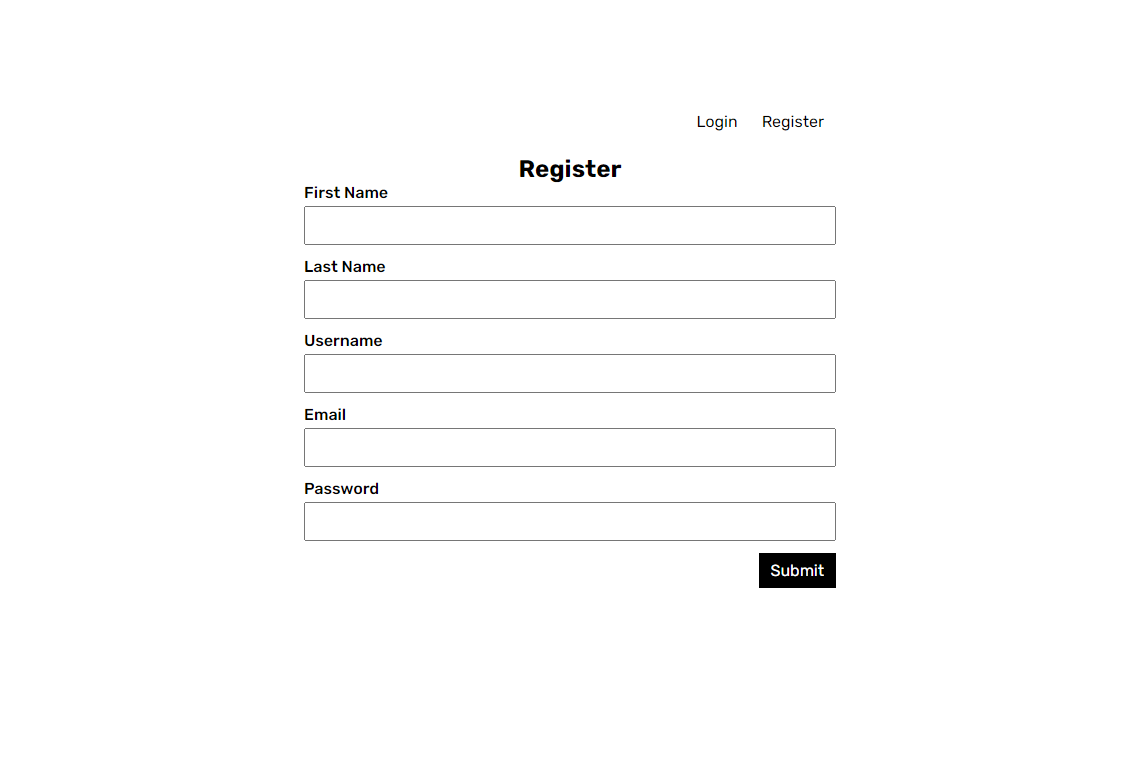
If we launch the App after doing the steps above, We'll see this page show:
Set up Profile Page
To view and edit our profile, let's create profile.jsx file inside the routes folder, then copy the code below:
import * as React from 'react';
import {
  Form,
  Link,
  useActionData,
  useLoaderData,
  useSubmit,
  useTransition,
} from '@remix-run/react';
import { json, redirect } from '@remix-run/node';
import { kontenbaseApiUrl } from '~/lib/kontenbase.server';
import { getToken, kontenbaseToken } from '~/utils/cookie';

export const action = async ({ request }) => {
  const formData = await request.formData();
  const profileID = formData.get('profileid');
  const token = await getToken(request);
  const operation = formData.get('operation');
  const headers = {
    Authorization: `Bearer ${token}`,
  };

  if (operation === 'upload image') {
    const responseUpload = await fetch(`${kontenbaseApiUrl}/storage/upload`, {
      method: 'POST',
      headers,
      body: formData,
    });

    const image = await responseUpload.json();

    const response = await fetch(`${kontenbaseApiUrl}/profile/${profileID}`, {
      method: 'PATCH',
      headers,
      body: JSON.stringify({
        image: image?.url,
      }),
    });

    if (responseUpload.status !== 200 || response.status !== 200) {
      return json({
        message: 'Failed to upload image',
      });
    } else {
      return json({
        message: 'profile updated!',
      });
    }
  }

  if (operation === 'update profile') {
    const firstName = formData.get('firstname');
    const lastName = formData.get('lastname');
    const phoneNumber = formData.get('phonenumber');
    const company = formData.get('company');
    const position = formData.get('position');
    const location = formData.get('location');
    const website = formData.get('website');

    const userResponse = await fetch(`${kontenbaseApiUrl}/auth/user`, {
      method: 'PATCH',
      headers,
      body: JSON.stringify({
        firstName,
        lastName,
        phoneNumber,
      }),
    });

    const profileData = {
      company,
      position,
      location,
    };

    if (website !== '') {
      profileData.website = website;
    }

    const profileResponse = await fetch(
      `${kontenbaseApiUrl}/profile/${profileID}`,
      {
        method: 'PATCH',
        headers,
        body: JSON.stringify(profileData),
      }
    );

    if (profileResponse.status !== 200 || userResponse.status !== 200) {
      return json({
        message: 'Failed to update profile',
      });
    } else {
      return json({
        operation,
        message: 'profile updated!',
      });
    }
  }

  if (operation === 'logout') {
    return redirect('/', {
      headers: {
        'Set-Cookie': await kontenbaseToken.serialize('', {
          maxAge: 0,
        }),
      },
    });
  }
};

export const loader = async ({ request }) => {
  const token = await getToken(request);

  if (!token) {
    return redirect('/');
  }

  const response = await fetch(`${kontenbaseApiUrl}/auth/user?$lookup=*`, {
    headers: {
      Authorization: `Bearer ${token}`,
    },
  });
  const user = await response.json();

  return json({
    user,
  });
};

const EditProfile = () => {
  const transition = useTransition();
  const submit = useSubmit();
  const loaderData = useLoaderData();
  const actionData = useActionData();
  const operation = transition.submission?.formData.get('operation');
  const [user, setUser] = React.useState('');
  const [profile, setProfile] = React.useState('');

  React.useEffect(() => {
    if (loaderData?.user) {
      setUser(loaderData.user);
      setProfile(loaderData.user?.profile?.[0]);
    }
  }, [loaderData]);

  React.useEffect(() => {
    if (actionData?.message && actionData?.operation === 'update profile') {
      alert(actionData.message);
    }
  }, [actionData]);

  const handleChangeImage = (event) => {
    submit(event.currentTarget, { replace: true });
  };

  return (
    <div className="profile-page">
      <div className="button-top">
        <Link className="button" to={`/${user?.username}`}>
          View Profile
        </Link>
        <Form method="post">
          <input type="hidden" name="operation" value="logout" />
          <button>Logout</button>
        </Form>
      </div>
      <div className="profile-wrapper">
        <div className="profile-header">
          <Form
            encType="multipart/form-data"
            method="post"
            onChange={handleChangeImage}
          >
            <input type="hidden" name="operation" value="upload image" />
            <input type="hidden" name="profileid" value={profile?._id} />
            <label className="label-file" htmlFor="file">
              <img
                className="image-avatar"
                width={90}
                height={90}
                src={
                  profile?.image
                    ? profile.image
                    : 'https://via.placeholder.com/90'
                }
                alt=""
              />
              <span>
                {operation === 'upload image' &&
                transition.state === 'submitting'
                  ? 'Uploading...'
                  : 'Change Image'}
              </span>
            </label>
            <input name="file" id="file" type="file" accept="image/*" />
          </Form>
        </div>
        <div className="card">
          <Form method="post">
            <input type="hidden" name="profileid" value={profile?._id} />
            <input type="hidden" name="operation" value="update profile" />
            <div className="card-field">
              <label>First Name</label>
              <input
                type="text"
                name="firstname"
                defaultValue={user?.firstName}
              />
            </div>
            <div className="card-field">
              <label>Last Name</label>
              <input
                type="text"
                name="lastname"
                defaultValue={user?.lastName}
              />
            </div>
            <div className="card-field">
              <label>Phone Number</label>
              <input
                type="text"
                name="phonenumber"
                defaultValue={user?.phoneNumber}
              />
            </div>
            <div className="card-field">
              <label>Company</label>
              <input
                type="text"
                name="company"
                defaultValue={profile?.company}
              />
            </div>
            <div className="card-field">
              <label>Position</label>
              <input
                type="text"
                name="position"
                defaultValue={profile?.position}
              />
            </div>
            <div className="card-field">
              <label>Location</label>
              <input
                type="text"
                name="location"
                defaultValue={profile?.location}
              />
            </div>
            <div className="card-field">
              <label>Website</label>
              <input
                type="url"
                name="website"
                defaultValue={profile?.website}
              />
            </div>
            <div className="form-button">
              <button type="submit" className="button button-primary">
                Update
              </button>
            </div>
          </Form>
        </div>
      </div>
    </div>
  );
};

export default EditProfile;
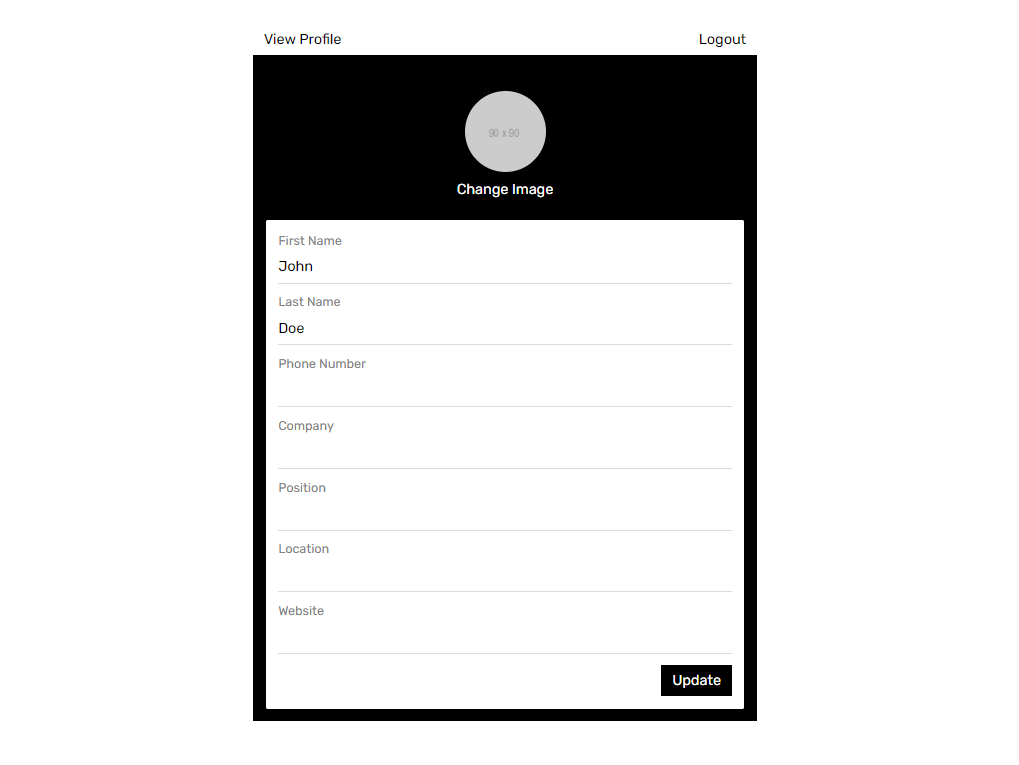
If we register or login successfully we should be navigated to Profile page. In this page we will able to edit profile and upload a picture.
Set up View Profile Based on the Username
Now we will create a page to show user profile based on the username defined in the URL. Example when user visit: app_url/johndoe,
this page will show user profile with username johndoe.
Create $username.jsx file inside the routes folder, Copy the code below:
import { Form, Link, useLoaderData } from '@remix-run/react';
import { json, redirect } from '@remix-run/node';
import { kontenbaseApiUrl } from '~/lib/kontenbase.server';
import { getToken, kontenbaseToken } from '~/utils/cookie';

export const action = async () => {
  return redirect('/', {
    headers: {
      'Set-Cookie': await kontenbaseToken.serialize('', {
        maxAge: 0,
      }),
    },
  });
};

export const loader = async ({ params, request }) => {
  const { username } = params;
  const token = await getToken(request);

  const response = await fetch(
    `${kontenbaseApiUrl}/Users?$lookup=*&username=${username}`
  );

  const authUserResponse = await fetch(`${kontenbaseApiUrl}/auth/user`, {
    headers: {
      Authorization: `Bearer ${token}`,
    },
  });

  const authUser = await authUserResponse.json();

  let isOwnProfile;

  if (authUser) {
    isOwnProfile = authUser.username === username;
  }

  const user = await response.json();

  return json({
    isOwnProfile,
    user,
  });
};

const Profile = () => {
  const loaderData = useLoaderData();
  const [user, setUser] = React.useState('');

  React.useEffect(() => {
    if (loaderData?.user) {
      setUser(loaderData.user?.[0]);
    }
  }, [loaderData]);

  return (
    <>
      {user && (
        <div className="profile-page">
          {loaderData?.isOwnProfile && (
            <div className="button-top">
              <Link className="button" to="/profile">
                Edit Profile
              </Link>
              <Form method="post">
                <button>Logout</button>
              </Form>
            </div>
          )}
          <div className="profile-wrapper">
            <div className="profile-header">
              <img
                className="image-avatar"
                width={90}
                height={90}
                src={
                  user.profile?.[0]?.image ?? 'https://via.placeholder.com/90'
                }
                alt=""
              />
              <h3 className="profile-title">
                <span>{user.firstName}</span> <span>{user.lastName ?? ''}</span>
              </h3>
              <p>{user.profile?.[0]?.position ?? 'position is null'}</p>
            </div>
            <div className="card">
              <h3>Contact</h3>
              <div className="card-field">
                <span>Name</span>
                <p>
                  {user.firstName} {user.lastName ?? ''}
                </p>
              </div>
              <div className="card-field">
                <span>Mobile</span>
                <p>{user.phoneNumber ?? 'phone number is null'}</p>
              </div>
              <div className="card-field">
                <span>Email</span>
                <a className="link-email" href="mailto:name@email.com">
                  {user.email}
                </a>
              </div>
              <div className="card-field">
                <span>Company</span>
                <p>{user.profile?.[0]?.company ?? 'company is null'}</p>
              </div>
            </div>
            <div className="card">
              <h3>Location</h3>
              <p>{user.profile?.[0]?.location ?? 'location is null'}</p>
            </div>
            <div className="card">
              <h3>Web Links</h3>
              <a
                className="website-link"
                href={user.profile?.[0]?.website ?? ''}
              >
                Website
              </a>
            </div>
          </div>
        </div>
      )}
    </>
  );
};

export default Profile;
And we're done to complete our App!